Keeping the Feel in Automotive Touch Controls
By Mark Toth, Business Development Manager, Haptics, Texas Instruments
Reprinted courtesy ECN magazine as "Keeping the
feel in automotive touch controls"
Featured Products
Featured Suppliers
Applications
Touchscreen interfaces on smartphones and tablets have swept through the consumer electronics industry, with
hundreds of millions of these touch-based devices sold each year. An entire generation of children is growing up
with touch as the primary interface to their electronics, rather than physical interfaces like keyboards, mice,
buttons, and so on. This trend of touch controls has spilled over into many other electronic systems, including home
automation, white goods, industrial controls and cars. Touch brings a variety of benefits to automotive controls:
- Cool factor - Fast, tablet-like touch response that today's digital natives expect;
automobile interior designs can become more smooth and sleek without the constraints of mechanical knobs, dials
and buttons.
- Improved reliability - Eliminating failure-prone electromechanical assemblies
results in fewer service appointments. Eliminating moving parts reduces vulnerability to moisture and dust.
- Reduced cost - Replacing the intricate manufacturing and assembly steps for
mechanical controls with the cost-effective electronics production process reduces production cost. The
electronics needed for touch controls can be lighter than switchgear, thus reducing vehicle weight and increasing
fuel efficiency.
The main concern of many automakers and their suppliers with moving to touch controls is safety. Drivers are quite
accustomed to traditional automotive controls, and the lack of tactile feedback in touch controls has been a safety
concern. This article talks about how electronic haptic feedback can alleviate the safety concerns associated with
touch controls.
One of the key challenges in advanced in-vehicle infotainment (IVI) system design is minimizing driver distraction.
Unlike tablet and smartphone interfaces, automotive touch systems cannot rely on the user's constant visual
attention to the display screen. In fact, one of the key measures of driver distraction is glance time associated
with a given task. Glance time measures how long a driver looks away from the road while performing a task related
to vehicle or infotainment control. The US National Highway Traffic Safety Administration (NHTSA) and the
International Society of Automotive Engineers both have published recommendations for glance times. NHTSA recommends
limiting glance time for "any task to under two seconds at a time, and 12 seconds total." [1]
An academic study [2] indicates that both mean glance time and number of total glances per task are reduced when
haptic feedback is used, compared to visual-only feedback. Another benefit shown by this study is that haptic
feedback keeps glance time low, even when the visual feedback is delayed or missing due to system response issues
(Figure 1).
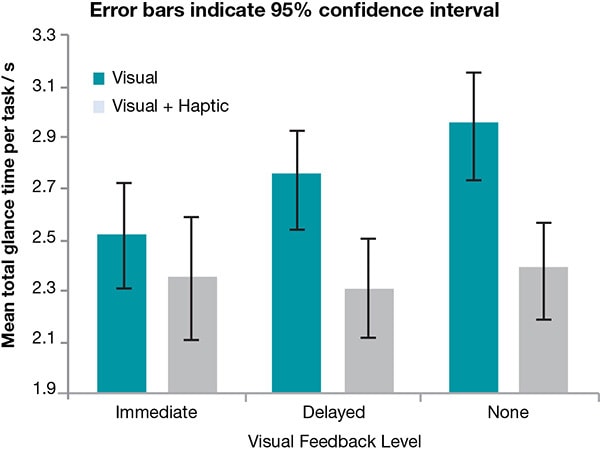 Figure 1
: Study data showing how haptic feedback reduces glance time even
if visual feedback is delayed or missing. (Source: Visual-haptic feedback interaction in automotive touchscreens,
Elsevier, Volume 33, Issue 1, January 2012)
When it comes to actually implementing haptic feedback, there are many different approaches and options. One option
is to implement a scan/select paradigm, where a user slides their finger across the touch screen, using haptic
effects to scan to the appropriate control, then lifts their finger to select the correct input.
This approach allows the user to locate controls on the screen by feel rather than by sight. An initial glance is
used to locate the screen, and then final selection is done based on tactile cues. This also could be implemented
using a pressure-sensitive touch surface, with a light touch used for scanning and a strong press of the screen used
to select controls. The scan/select paradigm provides a touch user interface which is uniquely possible with touch
interface compared to mechanical controls.
Touchpads, also known as track pads, can be used as infotainment controls. Touchpads eliminate fingerprints on
displays, and can be located closer to the driver in a center console which can result in more accurate inputs.
Haptic feedback and the scan/select approach can be integrated in touch pads in addition to touch screens.
Other traditional controls such as rotary dials, horizontal and vertical sliders can be simulated on touch screens,
and UI software can change the spacing of the haptic detents on such controls to make coarse or fine adjustments,
depending on the parameter being adjusted. Additionally, haptic feedback can indicate the endpoints of an adjustment
range or when a preset value is reached.
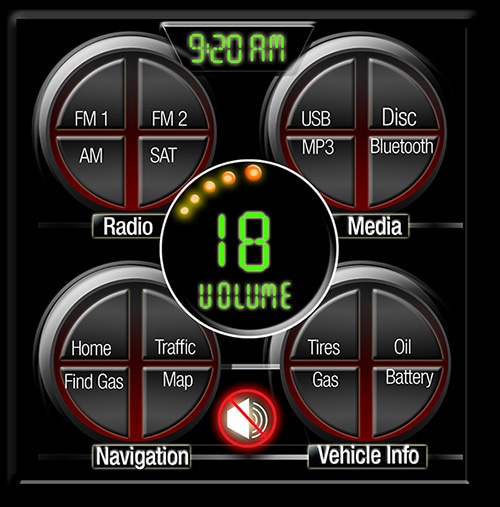
Figure 2a
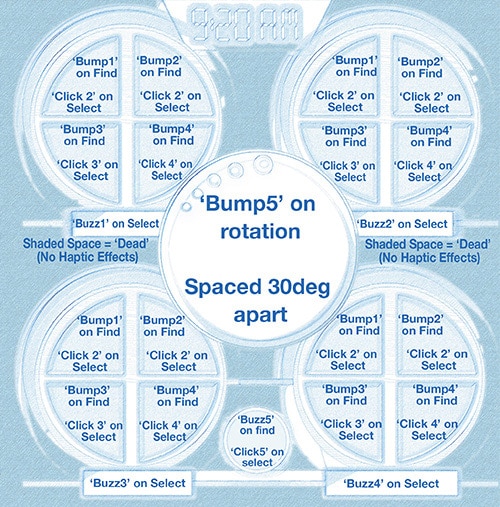
Figure 2b
Figure 2a & 2b: An example of how haptic effects could be mapped to a
vehicle infotainment Human-machine interface (HMI).
The infotainment system of a vehicle is not the only place where touch controls and haptic feedback can add value.
Common mechanical controls such as window-lift switches, overhead lighting controls, heating/ventilation and air
conditioning (HVAC) controls all can be replaced with touch controls, using haptic feedback as control confirmation
or indicating, for instance, the height to raise or lower a window. Even tactile feedback can be made part of a
keyless entry system where the driver gets a haptic effect when activating the key fob or door handle. Using
inductive sensing technology can enable metal surfaces to become touch-aware. Replacing old-fashioned mechanical
controls with touch controls can give drivers the high-tech feel that they are accoustomed to from their consumer
electronics.
Conclusion
As the human-machine interface (HMI) systems of vehicles become more and more focused on entertainment and more
like the UIs of consumer electronics, it is important to remember the important safety challenges in the automotive
world. Driver safety cannot be compromised in the search for cool and engaging user experience and the quest to
monetize in-vehicle content. Implementing haptic feedback can help reduce driver distraction while enabling the
advanced, tablet-like user experience for which car buyers are looking.
References
- 1. US National Highway Traffic Safety Administration, Voluntary guidelines reduce visual-manual distraction -
the greatest safety risk to drivers in NHTSA's new study, April 23, 2013.
- 2. Pitts et al, “Visual-haptic feedback interaction in automotive touchscreens, Displays, January 2012.


 South Africa


